




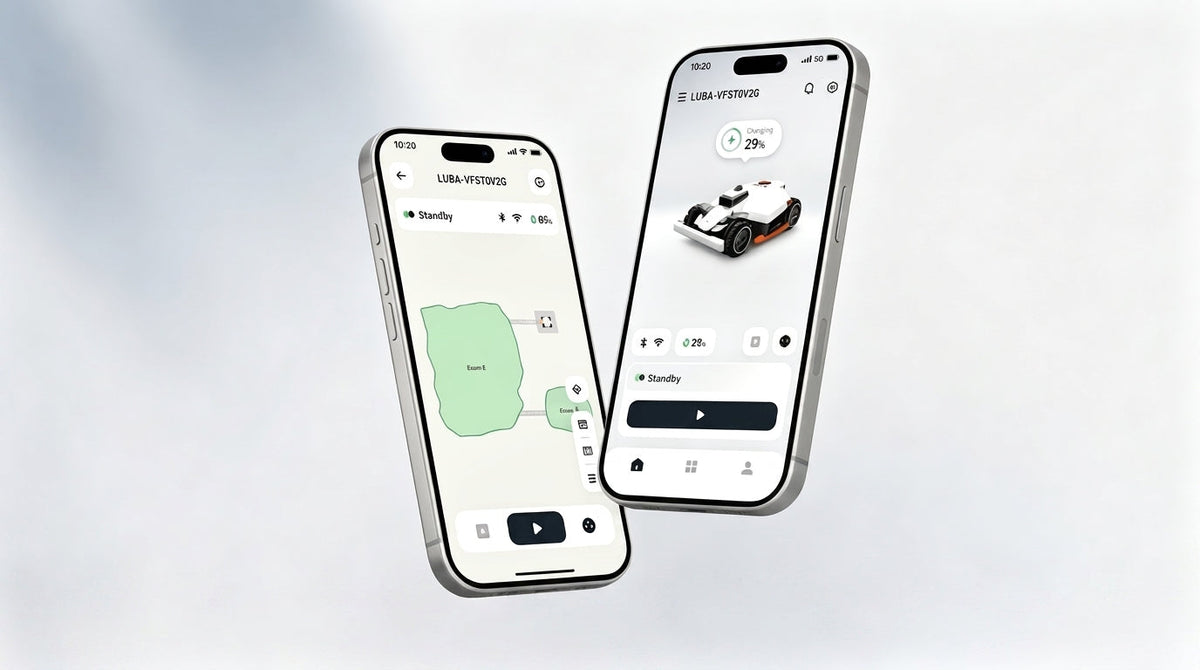
Over the past few months, we've rolled out a batch of new features to the Mammotion app. This update was aimed squarely at the issues we'd heard about most often: fiddly map corrections, high running costs and battery wear, mowing performance dropping off in cold weather, a navigation path that took too many taps to get anywhere, and uncertainty over whether iNavi actually works where you live. Here's a proper run-through, section by section.
At a Glance
- Map Management: Making Mapping and Editing Easier
- Route & Mowing Settings: Smarter Paths, Smoother Runs
- Battery Management: Better Efficiency, Lower Running Costs
- Eco-Friendly Features: Low-Temperature Preheating + Deep Sleep
- UI/UX Redesign: Moving Away from "Machine-Cold" Interfaces
- iNavi Coverage Check
- Rain Protection ✨ NEW
- Resume Task ✨ NEW
- App Remote Control
1. Map Management: Making Mapping and Editing Easier
| Feature | Supported Models | Status |
|---|---|---|
| Redraw Section | LUBA 3 AWD / LUBA mini 2 AWD Series / YUKA mini 2 Series | Already launched |
| Station-Free Mapping | LUBA 3 AWD / LUBA mini 2 AWD Series / YUKA mini 2 Series | Already launched |
| Custom Zone Settings | LUBA 3 AWD / LUBA mini 2 AWD Series / YUKA mini 2 Series | Already launched |
| Cloud Backup | LUBA 3 AWD / LUBA mini 2 AWD Series / YUKA mini 2 Series, LUBA mini Series | Already launched |
| Real View ✨ NEW | LUBA 3 AWD / LUBA mini 2 AWD Series / YUKA mini 2 Series | 12 August 2026 |
Map-related tasks are what people use most often, so this is also where most of the changes have landed — covering everything from quick fixes to region settings to cloud syncing.
Redraw Section
Previously, if one section of a boundary wasn't quite right, you'd often have to scrap the whole map and start again — even if ninety per cent of it was fine. Now you can simply select the problem section on the map and redraw that only, while everything you've already confirmed stays exactly as it was. Editing becomes far more contained, and you don't need to worry that fixing one area will mean re-checking everything else.

Station-Free Mapping
Manual mapping no longer has to begin at the charging station. You can start from anywhere in the garden, which is particularly handy if the entrance is some distance from the dock, so there's no need to carry the mower back first.
If there's an isolated area the mower can't physically reach — steps, for instance — you can simply carry it over and map that section separately. Once complete, this isolated map is displayed alongside your other regular maps automatically, with no manual stitching required.

Custom Zone Settings
Editing no-go zones, virtual fences and obstacle-free zones now comes with clear, step-by-step guidance built in. Once you're in edit mode, the app walks you through exactly what to do next, so there's no need to understand the logic behind each zone type beforehand — even a first-time user can follow the prompts through to completion.

Cloud Backup

You can now save up to ten maps to your Mammotion account in the cloud. These maps are tied to your account rather than the device, so if you switch phones or add a new mower, simply signing in transfers your map data automatically — no manual export or re-mapping required. Particularly useful if you're upgrading devices or managing the same garden from more than one phone.

Real View
Once a task is complete, the app can generate a textured, real-world image of your garden rather than the usual abstract boundary outline — giving you a much clearer picture of which areas have been covered and how accurately the map matches your actual garden.

2. Route & Mowing Settings: Smarter Paths, Smoother Runs
| Feature | Supported Models | Status |
|---|---|---|
| Auto-Reverse Mowing Direction ✨ NEW | LUBA 3 AWD, YUKA mini 2 (Vision & LiDAR), LUBA mini 2 AWD | 12 August 2026 |
| Travel Speed ✨ NEW | LUBA 3 AWD / LUBA mini 2 AWD Series / YUKA mini 2 Series | 12 August 2026 |
How the mower moves matters just as much as where it mows. This update brings two small but practical improvements — smarter route direction to keep your lawn looking even, and finer control over how briskly the mower gets around the garden.
Auto-Reverse Mowing Direction
When turned on, the mower automatically alternates the direction of its mowing routes between tasks to help reduce grass matting. On LUBA 3 AWD and YUKA mini 2 (Vision & LiDAR versions), this applies to both interior and perimeter routes; on LUBA mini 2 AWD 1000 & 1500, it applies to interior routes only.

Travel Speed
You can now adjust the mower's autonomous travel speed for when it isn't actively mowing. This setting is separate from mowing speed, manual control speed, and the speed configured for Wildlife Safety, so adjusting it won't affect how the mower behaves during a task.

3. Battery Management: Better Efficiency, Lower Running Costs
| Feature | Supported Models | Status |
|---|---|---|
| Adaptive Recharge | LUBA 3 AWD / LUBA mini 2 AWD Series / YUKA mini 2 Series | Already launched |
| Set a Charge Limit to Extend Battery Life | LUBA 3 AWD / LUBA mini 2 AWD Series / YUKA mini 2 Series | Already launched |
| Off-Peak Charging for Lower Energy Costs | LUBA 3 AWD / LUBA mini 2 AWD Series / YUKA mini 2 Series | Already launched |
Charging sounds simple enough, but different users care about different things — some are focused on runtime, others on electricity costs or battery longevity. This update addresses all three.
Adaptive Recharge
The mower works out exactly how much charge it needs to finish the remaining area, then recharges to that target rather than always topping up to a fixed percentage or charging fully. This cuts down on both wasted charging time and the annoyance of running low mid-task, striking a better balance between efficiency and battery wear.
Set a Charge Limit to Extend Battery Life
You can set a manual charging cap in the app — 80%, say — to stop the battery sitting at full charge long-term, which helps extend its lifespan. Alternatively, Smart Mode handles this automatically: the mower maintains a lower storage charge day to day and only tops up fully shortly before its next scheduled task. Which option suits you best comes down to whether you prioritise runtime or battery longevity.
Off-Peak Charging for Lower Energy Costs
You can set specific charging windows so the mower only draws power during cheaper off-peak periods. Once configured, it runs automatically without any further input, so your day-to-day routine doesn't need to change at all.

4. Eco-Friendly Features: Low-Temperature Preheating + Deep Sleep
| Feature | Supported Models | Status |
|---|---|---|
| Low-Temperature Preheating | LUBA mini 2 AWD Series | Already launched |
| EcoSleep Mode | LUBA 3 AWD / LUBA mini 2 AWD Series | Already launched |
| Task Report | LUBA 3 AWD / LUBA mini 2 AWD Series / YUKA mini 2 Series | Already launched |
Beyond simply saving power, this update also makes the environmental impact easier to see — so the benefits aren't just a vague sense of "using less", but something you can put a number on.
Low-Temperature Preheating
In colder climates, or during autumn and winter, the battery automatically warms itself to an optimal temperature before mowing begins. This prevents the performance drop that comes with operating a cold battery, and also helps prolong its overall lifespan — particularly useful if you're in an area with big day-to-night temperature swings, or still mowing through the colder months.

EcoSleep Mode

When the charging station is sitting idle — no mower charging and no task due imminently — it automatically drops into a deep, low-power sleep state. Based on Mammotion Atlas Lab's figures, this is expected to save around 100 kWh a year. It's entirely automatic and needs no input from you.

Task Report
The Task Report brings together three elements. The Green Life Report converts the energy you've saved into an equivalent emissions figure, unlocking green badges as your savings build up, so you can check your environmental impact whenever you like. Total Time Saved compares how long the same area would take to mow with a push mower against the time your Mammotion has actually spent on it, with the difference showing the time you've reclaimed. The Annual Report pulls together a full year's worth of mowing data so you can look back over how the mower's been used.

5. UI/UX Redesign: Moving Away from "Machine-Cold" Interfaces
| Feature | Supported Models | Status |
|---|---|---|
| Reimagined Home Screen | Full 2025 & 2026 range | iOS already launched; Android by late 2026 |
| Dual-Mode Operation Settings | Full 2025 & 2026 range | iOS already launched; Android by late 2026 |
| Device Management | Full 2025 & 2026 range | iOS already launched; Android by late 2026 |
| Renewed Mapping Interaction | Full 2025 & 2026 range | iOS already launched; Android by late 2026 |
| AI Obstacle Detection: Basic ✨ NEW | LUBA 3 AWD / LUBA mini 2 AWD Series / YUKA mini 2 Series | 12 August 2026 |
The overall direction of this redesign is a shift away from a colder, more industrial-looking interface towards a design language built around natural materiality, with clearer visual hierarchy throughout.
Reimagined Home Screen: Clarity & Intelligence
The home screen layout is cleaner overall, with proactive notification bubbles that surface anything needing your attention. A new second screen has also been added, putting your most-used shortcuts just a swipe away rather than buried several menus deep.

Dual-Mode Operation Settings
Task settings now offer a choice between Simplified and Expert modes — Simplified keeps only the essentials on show, while Expert opens up the full set of parameters, letting you switch depending on how familiar you are with the settings. Cutting height adjustment has also moved from fixed presets to 1mm (roughly 0.1 inch) increments for far finer control.

Device Management
For anyone running multiple devices, the device list and status display have been specifically reworked to make switching and monitoring more straightforward. Single-device users get a simplified path too, without the extra steps needed to accommodate multi-device scenarios.

Renewed Mapping Interaction
Map-related actions now follow a vertical browsing structure with a much clearer hierarchy, and the redesign has deliberately left room for the additional map features due to arrive over the coming months, so the interface won't feel cramped as more functionality is added.
The redesign is now fully live on iOS, with the Android version being rolled out gradually towards the end of 2026. All of the following are supported across the full 2025 and 2026 robot mower range.
AI Obstacle Detection: Basic
A new Basic mode has also been added under AI Obstacle Detection, designed for typical lawns. In Basic mode, the mower automatically avoids obvious obstacles such as people and vehicles, but does not detect tall grass, low steps, or bodies of water. If your task area contains hazards like drop-offs or ponds, mark them as No-Go Zones before switching to this mode.

6. iNavi Coverage Check
For anyone relying on iNavi positioning, "does this actually work where I live?" is a question that tends to come up both before and after purchase — this update puts the answer directly in the app.
You can now check the iNavi coverage status for your current location straight from the app, confirming whether the service is available in your area without needing to set the mower up first to test it.

- Supported models: the full 2025 and 2026 range of iNavi-compatible robot mowers, of which LUBA 3 AWD, LUBA mini 2 1000 and YUKA mini 2 800 currently support this feature
- The remaining models to follow
7. Rain Protection ✨ NEW
Rain Protection now offers two modes: Smart and Sensor. Smart Mode uses online weather data to automatically decide when to pause and resume a task, while Sensor Mode relies on the mower's built-in rain sensor to detect rainfall — letting you set a custom delay before the task resumes once the rain has stopped. Once triggered, the mower automatically returns to the charging station and resumes the unfinished task after the protection period ends.

- Launched: 12 August 2026
- Supported models: LUBA 3 AWD, YUKA mini 2, LUBA mini 2 AWD
8. Resume Task ✨ NEW

Mowing sessions get interrupted more often than you'd think — a shower rolling in, a dog needing a walk, or simply forgetting to restart after pausing manually. Any of these could previously mean either a patch left unmown or the whole job starting over.

The mower can now resume an interrupted or paused task from the exact point it stopped, rather than replanning the route from scratch. This avoids the wasted effort of missed patches or duplicated mowing, and saves the time that would otherwise go into re-covering ground already done.
- Expected launch: 12 August 2026
- Supported models: LUBA 3 AWD / LUBA mini 2 AWD Series / YUKA mini 2 Series
9. App Remote Control
For anyone who travels frequently, or simply wants to check on the garden while out, remote control is one of the most-used features going.
As long as both your phone and the mower are connected to the internet (via Wi-Fi or cellular networks like 4G), you can check on the mower's status and send it tasks from anywhere — no need to be on the same local network.

- Expected launch: 2025 models from early August 2026; 2026 models from mid to late August 2026
- Supported models: the full 2025 and 2026 robot mower range
Conclusion
That covers all the key updates currently live or scheduled to launch soon. To be the first to know about upcoming Mammotion app features, bug fixes, and tips, be sure to follow our official social media channels where we share regular release previews and updates!
As always, if you run into any issues, our support team is ready to help — and if you have feedback on any feature, please share it with us via the in-app channel.

Did you like this article? Add us as a preferred source to find us more easily on Google.